Plan
together
Move
with clarity
Collaboration
at its finest.
One shared board per project — plan, work together in real time, and turn ideas into step-by-step guides with AI.
Personal • Teams • Consultants • Enterprise
Boards for execution.
AI for daily work.
A board for each part of your work
Create a board for each project, client, or team. Keep plans, conversations, tasks, and guides inside it — so everyone knows what's happening and what to do next.
AI built into the board
BORDS AI reads your boards and helps with whatever comes next — writing a plan, drafting a guide, or answering a question for your team.
Work together in real time
Work on the same board at the same time — with live updates, no version conflicts, and no need to jump between apps.
Offline-first. Always in sync.
Work locally, collaborate globally, and keep structured boards reliable with conflict-free syncing.
Everything your team
a board for every part of your work.
A board for every project, team, or client — each one holding everything that work needs.
01 / Stop switching between tools
Instead of juggling docs, chats, tasks, and whiteboards, BORDS keeps everything in one board your team can work from directly.
02 / AI that understands your work
BORDS AI lives inside your boards. It helps you plan, write guides, and answer questions — using what your team has already built, not generic suggestions.
03 / Build a knowledge base as you work
As your team works, BORDS builds up a record of how things get done — so anyone can find answers, get up to speed quickly, and keep improving.
Personal use • Startups and teams • Consultants • Enterprise deployment
How BORDS becomes
your company brain.
BORDS builds a shared memory of how your team works — so nothing gets lost and everyone knows what to do.
Your team's knowledge comes from the work itself.
Instead of notes nobody reads, BORDS connects your plans, work, and decisions in one place — so your team can look things up, bring new people up to speed, and build on what came before.
Mechanism
Capture: your work, decisions, and conversations stay attached to the right board
Structure: plans become step-by-step guides your team can follow
Retrieve: ask the AI how things work and get answers from your own boards
Assist: teammates get clear next steps based on how your team actually works
Improve: every update makes the whole system a little more useful
The more your team uses BORDS, the more useful it becomes.
Result: anyone on the team can ask what to do, why things work a certain way, and what's changed — then get straight back to work.
AI that knows
what you're working on.
Most AI tools give generic answers. BORDS AI answers using your actual boards — so the help it gives is specific to how your team works.
01 / You control the context
Pick which boards the AI should know about. It only reads what you choose to share with it.
02 / Ask inside the work
Draft plans, write guides, ask questions — and get answers based on what your team has actually built, not guesswork.
03 / Responses that compound
You chat with BORDS AI right inside the board. When an answer is worth keeping, you can save it straight to a board — turning it into a plan, a guide, or a logged decision.
Context you control · Grounded answers · Embedded in your workflow
Collaborate on
the same system.
Watch live cursors move across one shared board. Plan together, execute together, and keep every decision in context.

Live Awareness
See exactly where teammates are working with live cursors
Instant Sync
Changes appear immediately for everyone on the board
Conflict-Free
CRDTs ensure all edits merge without data loss
Everything you need
in one place.
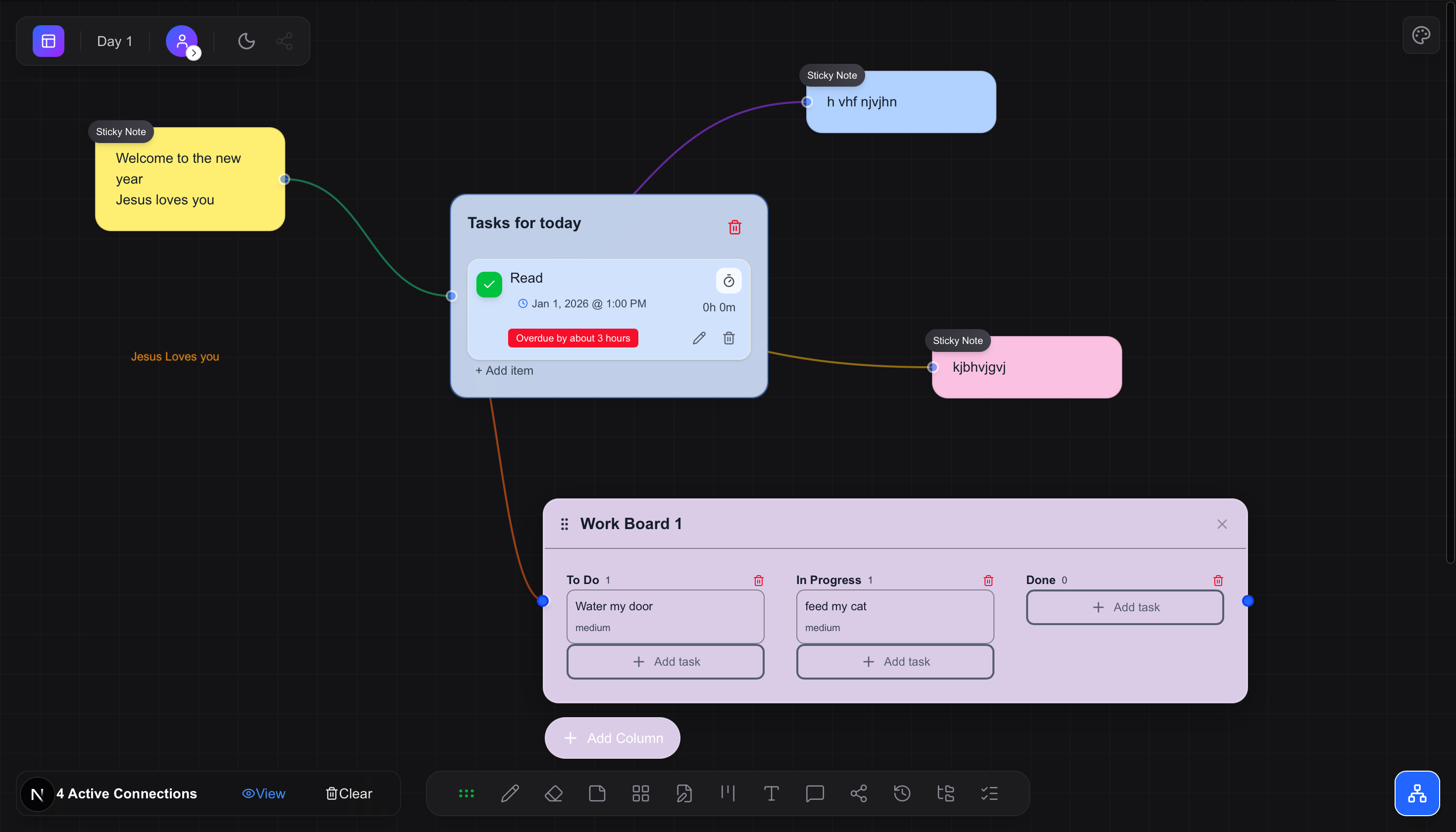
Drop any of these modular blocks anywhere on your infinite canvas. Mix, stack, and connect them however you work best.
Sticky Notes
Quick ideas with customizable colors. Click to expand into full editing mode.
Checklists
Track tasks with due dates and email reminders. Assign to team members.
Kanban Boards
Full kanban columns with draggable cards, priorities, and workflows.
Sticky Notes
Quick ideas with customizable colors. Click to expand into full editing mode.
Checklists
Track tasks with due dates and email reminders. Assign to team members.
Kanban Boards
Full kanban columns with draggable cards, priorities, and workflows.
Text Blocks
Long-form rich text. Write documentation right alongside visual elements.
Media
Upload images and files. Cloud storage with drag-and-drop support.
Tables
Structured data in tabular format. Organize info that needs structure.
Text Blocks
Long-form rich text. Write documentation right alongside visual elements.
Media
Upload images and files. Cloud storage with drag-and-drop support.
Tables
Structured data in tabular format. Organize info that needs structure.
Drawings
Freehand sketching with pen, arrows, highlights, and shapes.
Connections
Visual lines linking items. Map relationships and dependencies.
Reminders
Time-based notifications. Never miss a deadline with email alerts.
Drawings
Freehand sketching with pen, arrows, highlights, and shapes.
Connections
Visual lines linking items. Map relationships and dependencies.
Reminders
Time-based notifications. Never miss a deadline with email alerts.
Sticky Notes
Quick ideas with customizable colors. Click to expand into full editing mode.
Checklists
Track tasks with due dates and email reminders. Assign to team members.
Kanban Boards
Full kanban columns with draggable cards, priorities, and workflows.
Text Blocks
Long-form rich text. Write documentation right alongside visual elements.
Media
Upload images and files. Cloud storage with drag-and-drop support.
Tables
Structured data in tabular format. Organize info that needs structure.
Drawings
Freehand sketching with pen, arrows, highlights, and shapes.
Connections
Visual lines linking items. Map relationships and dependencies.
Reminders
Time-based notifications. Never miss a deadline with email alerts.
Plus grid snapping, connections, and more.
Built to get things done.
Infinite Board Canvas
Boards are your team's shared workspace — plans, tasks, notes, and guides all in one place.
Real-Time Collaboration
Collaborate with friends or teams in real time, with live cursors, offline reliability, and conflict-free syncing.
AI that knows your work
BORDS AI lives inside your boards. Ask it anything — it uses what your team has already built to give useful, specific answers.
Personal boards to team operations.
Start solo or with friends, then scale into startup and team workspaces without changing how your system is organized.
← Back to workspace
Jamie Cole
Personal workspace
Member since 3/14/2026
Personal Workspace
Welcome back, Jamie Cole
0
In Progress
0
Completed
0
Overdue
0
High Priority
Focus
No active tasks
Recent Boards
Client Onboarding
5/1/2026
Q3 Product Roadmap
4/30/2026
0 of 0 tasks completed
Switch between workspaces instantly. Your context, your control.
One workspace.
Less chaos.
BORDS brings your plans, tasks, team conversations, and how-to guides into one shared board.
- Collaboration-first by design
- AI that knows what your team is working on
- From personal planning to company operations
A board for every project
Create as many boards as you need — one per project, client, or team. Plans, tasks, guides, and conversations all live inside it.
AI integrated with collaboration
BORDS AI helps you plan, write guides, and answer questions — right where your team is already working.
Built for real workflows
From personal planning to startup execution to enterprise deployment, BORDS scales with your workflow without losing clarity.
From solo to startup
Start solo, collaborate with friends, and grow into team operations without starting over.
✓ Infinite board canvas
✓ Real-time collaboration + offline sync
Build systems clients can run
Build board systems and guides for your clients, then hand them over knowing the AI will help the team get up to speed.
✓ Board structures clients can follow
✓ New teammates learn how things work inside the board
Dedicated by BORDS team
We set up and manage a private BORDS environment for your company — with your data kept separate and secure.
✓ Your data stays private and separate
✓ Contact us to plan your setup
We believe teams work better when there's a clear shared system. BORDS helps you build one.
Visual
Boards hold everything — plans, diagrams, notes, and team knowledge — all in one place.
Flexible
Works for personal use, small teams, and fast-growing companies — without needing to start over.
Collaborative
Live collaboration keeps teammates and friends aligned in the same workspace.
Calm
When everything lives in one board, there's less confusion and less time wasted chasing updates.
Smart
BORDS AI uses what's already in your boards to give useful, specific answers — not generic suggestions.
Bring your team's
work into one place.
Start for free and invite your team. Need a private setup for your company? Get in touch.